
Split Prepaid Meters Explained: How They Work and How to Get the Most From One
Published 22 September 2026
What a split prepaid meter is
Like any prepaid meter, a split meter lets a tenant pay for electricity before using it. The tenant buys a token, loads it, and the meter supplies power until the credit runs out.
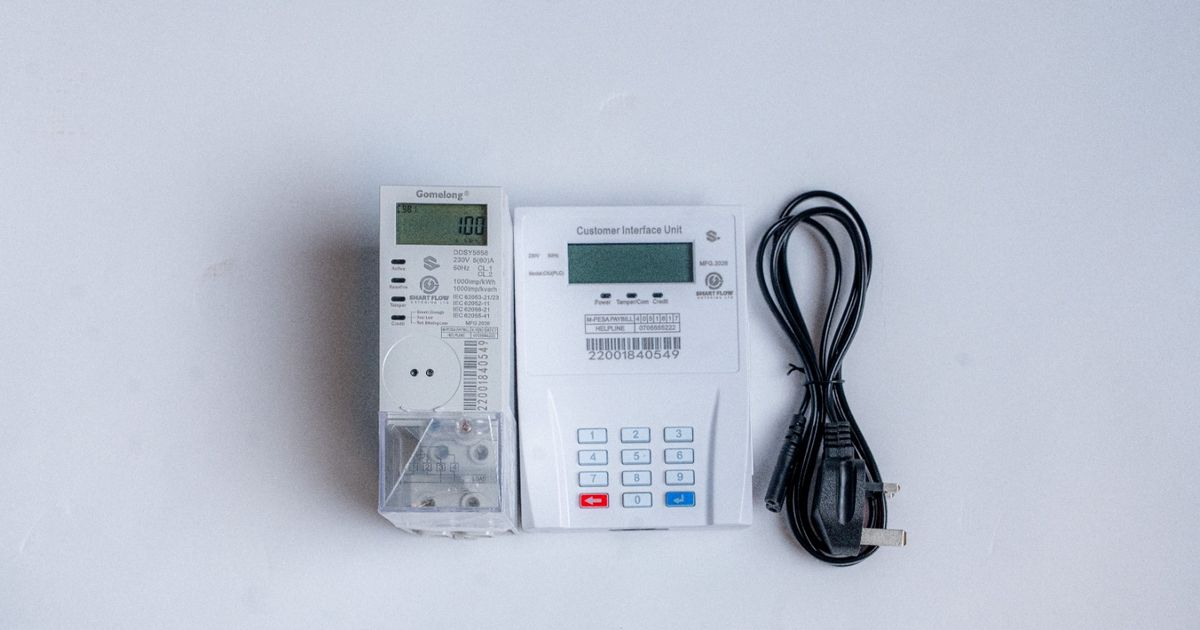
The difference is in the design. A split meter comes in two separate parts:
- The meter unit. This measures the electricity and switches it on and off. It is installed in the distribution board, a locked meter cabinet or a kiosk, where tenants cannot reach it.
- The keypad, often called the CIU (Customer Interface Unit). This is a small unit with a keypad and screen that lives inside the tenant's home. The tenant uses it to enter tokens and check their balance.
The two parts talk to each other, so everything the tenant does on the keypad is carried out by the meter locked away elsewhere.
Compare this with an integrated meter, where the meter, keypad and screen are all in one box within the tenant's reach. Integrated meters are simpler and cheaper. Split meters cost more, but they are much harder to tamper with.
Why split the meter at all?
The main reason is security. With an integrated meter, the whole device sits where the tenant can touch it. With a split meter, the part that actually measures and controls the power is locked away. A tenant can only interact with the keypad, and the keypad has no control over the power on its own.
This makes a split meter the stronger choice for:
- Properties that have had problems with meters being bypassed or tampered with
- Larger apartment blocks, where meters can be grouped neatly in one locked cabinet
- Higher-end residential and commercial units
- Buildings where the landlord or caretaker wants every meter in one place for inspection
There is a comfort benefit too. The tenant gets a neat keypad on the wall inside their home, and does not have to go out to a corridor or meter room to top up.
How the keypad and meter talk to each other
The keypad and the meter need a way to communicate. There are three common methods:
- Powerline (PLC). The keypad plugs into an ordinary wall socket and sends its messages through the building's existing electrical wiring. No extra cables are needed. This is the most common method for rental units.
- Radio (RF). The keypad talks to the meter wirelessly, a bit like a remote control. It can be mounted anywhere within range.
- Wired. A thin cable runs directly between the keypad and the meter. It is very reliable, but the cable has to be installed and is usually limited to a short distance.
Whichever method is used, each keypad is paired with one specific meter. That is how a tenant's keypad controls their own meter and nobody else's.
How a token works
The 20-digit token a tenant receives by SMS works exactly the same way on a split meter as on any other prepaid meter.
Almost every prepaid meter uses an open standard called STS (Standard Transfer Specification). The token is encrypted with a secret key that belongs to one meter only. When the tenant types it into the keypad, the keypad passes it to the meter, the meter unlocks it with its key, checks it has never been used before, and adds the units.
That means:
- No internet or SIM card is needed.
- A token only works on the meter it was bought for.
- A token only works once.
- A token cannot be guessed or forged.
How the meter uses up credit
The meter counts down as power is used and shows the balance on the tenant's keypad. When credit gets low, the keypad beeps or shows a warning. At zero, the meter cuts the power, and entering a new token restores it straight away.
Many keypads also have batteries. These keep the keypad working when the power is off, for example when the credit has run out and the tenant needs to enter a new token. Flat batteries are one of the most common reasons a keypad stops responding, so it is worth replacing them before they run down completely.
What the screen is telling you
Messages vary slightly between models, so keep the manual handy. The token messages are the same as on any STS meter:
- ACCEPT or OK: the token worked.
- REJECT: the token could not be unlocked. Usually it was bought for a different meter number or mistyped.
- USED: this token has already been loaded on this meter.
- OLD: a newer token has already been loaded, so this one is out of date.
- FULL: the balance is too high to take this token right now.
Split meters add one more family of messages that integrated meters do not have: communication errors. These appear as messages such as COMMS FAIL, CON FAIL, NO LINK or PLC ERROR. They mean the keypad cannot reach the meter. The meter itself is usually fine, and the tenant's power is still on if they have credit. The next section explains how to fix this.
Tamper or bypass messages mean exactly what they say. The tenant should not try to fix these and should contact the meter provider.
Fixing the most common keypad problems
Most split meter support calls come down to the keypad losing contact with the meter. The fixes are simple.
Plug the keypad straight into a wall socket. Extension cords and multi-plugs weaken the powerline signal. The keypad should go directly into a wall socket in the tenant's own unit, which is supplied through their meter.
Keep chargers and inverters away while loading a token. Phone chargers, laptop chargers, UPS units, inverters and some LED lights create electrical noise on the wiring that can block the signal. If a token will not go through, unplug these for a moment and try again.
Replace the batteries. Use good quality batteries. Weak batteries cause blank screens and failed tokens even when everything else is fine.
Move the keypad closer. For radio keypads, thick walls, metal doors and long distances weaken the signal. Moving the keypad nearer to the meter often fixes it.
Power cycle it. Unplugging the keypad, removing the batteries for a couple of minutes, and then putting everything back makes it reconnect to the meter.
If none of this works, the keypad or the pairing may need attention from the meter provider.
What happens if a keypad is lost or damaged
Because each keypad is paired with one meter, a replacement keypad cannot just be taken out of the box and used. It needs to be paired with the right meter by the provider or installer.
This is worth planning for:
- Tell tenants the keypad belongs with the unit and must stay behind when they move out.
- Write the meter number on a label on or near the keypad.
- Keep a record of which keypad and which meter serve each unit.
The good news is that a lost keypad does not put the meter at risk. The meter stays locked away, and nobody can add credit or change anything without a valid token made for that exact meter.
Choosing the right split meter
Make sure it is STS certified. This ensures tokens are secure and the meter works with standard vending systems.
Pick the right communication method. Powerline keypads suit most rentals because they need no extra wiring. Radio suits places where the keypad needs to be mounted away from a socket. Wired suits cases where the keypad sits close to the meter and reliability matters most.
Pick the right current rating. Add up what a tenant might run at once. An electric shower, a kettle and an iron together draw around 26 amps. Single-phase split meters commonly handle 60 to 80 amps, which covers most homes and small shops. Heavier loads need a three-phase meter.
Choose a clear keypad screen. A backlit display that shows the balance and messages plainly will save you calls.
Installing it properly
Use a licensed electrician. The meter unit is wired into your distribution board after the main meter. Good workmanship here prevents faults, heating and false trips.
Group meters in one secure place. DIN rail split meters are compact, so several can sit side by side in one locked cabinet. This keeps them safe and makes inspection easy.
One meter per unit, on its own circuit. Each unit's wiring must pass only through its own meter, otherwise readings will not be fair and powerline keypads may pick up the wrong signals.
Keep shared loads off tenants' meters. Security lights, gates, pumps and corridor lights belong on your own supply.
Test each keypad before handing over. Load a small token from inside each unit to confirm the keypad reaches the right meter.
Label everything. Mark each meter in the cabinet with its unit number, and label each keypad with its meter number.
Tips to share with tenants
- Plug the keypad directly into the wall, never into an extension.
- Keep fresh batteries in the keypad.
- If a token will not load, unplug phone chargers and inverters and try again.
- Save your meter number on your phone. You need it for every purchase.
- Leave the keypad in the house when you move out.
- If you see a tamper or bypass message, call your provider and do not touch the meter.
The bottom line
A split prepaid meter puts the part that matters out of reach and gives the tenant a simple keypad in their home. It costs a little more than an integrated meter, but it is the most secure way to meter rental units. Install the meters together in a locked cabinet, pair and test every keypad, and teach tenants the few simple habits that keep the keypad talking to the meter.